CDK Bootstrap
Overview
AWS CDK Bootstrap prepares your AWS account for deploying CDK applications by creating essential infrastructure resources. This is a one-time setup process per AWS account/region combination that establishes the foundation for all CDK deployments.
What CDK Bootstrap Creates
The bootstrap process provisions the following AWS resources in your account:
1. S3 Bucket (CDK Assets Bucket)
- Stores Lambda function deployment packages
- Stores CloudFormation templates
- Stores file assets referenced by your CDK stacks
- Naming pattern:
cdk-hnb659fds-assets-{ACCOUNT-ID}-{REGION} - Versioning enabled for rollback support
2. CloudFormation Stack (CDKToolkit)
- Main infrastructure stack containing all bootstrap resources
- Stack name:
CDKToolkit - Manages lifecycle of bootstrap resources
3. IAM Roles
cdk-hnb659fds-cfn-exec-role: CloudFormation execution role for deploying stackscdk-hnb659fds-deploy-role: Role used by CDK CLI during deploymentcdk-hnb659fds-file-publishing-role: Role for uploading assets to S3cdk-hnb659fds-lookup-role: Role for reading environment context
4. SSM Parameters
/cdk-bootstrap/hnb659fds/version: Stores bootstrap version number- Used for compatibility checking
Infrastructure Stacks Overview
After bootstrapping, our project will deploy multiple CDK stacks defined in D:\Project_AWS\everyonecook\infrastructure\lib\stacks:
- auth-stack.ts: Authentication and authorization infrastructure (Cognito)
- backend-stack.ts: Core backend services and Lambda functions
- certificate-stack.ts: SSL/TLS certificates management
- core-stack.ts: Core infrastructure resources
- dns-stack.ts: Route 53 DNS configuration
- observability-stack.ts: Monitoring, logging, and observability
These stacks depend on the bootstrap infrastructure to deploy successfully.
Lab Instructions: Bootstrap Your AWS Account
Prerequisites
Before beginning this lab, ensure you have:
- AWS CLI installed and configured (see section 5.1)
- AWS CDK CLI installed (see section 5.2)
- Valid AWS credentials configured
- IAM user with
AdministratorAccesspermissions or equivalent - Terminal/PowerShell access to the project directory
Step 3: Verify on AWS Console
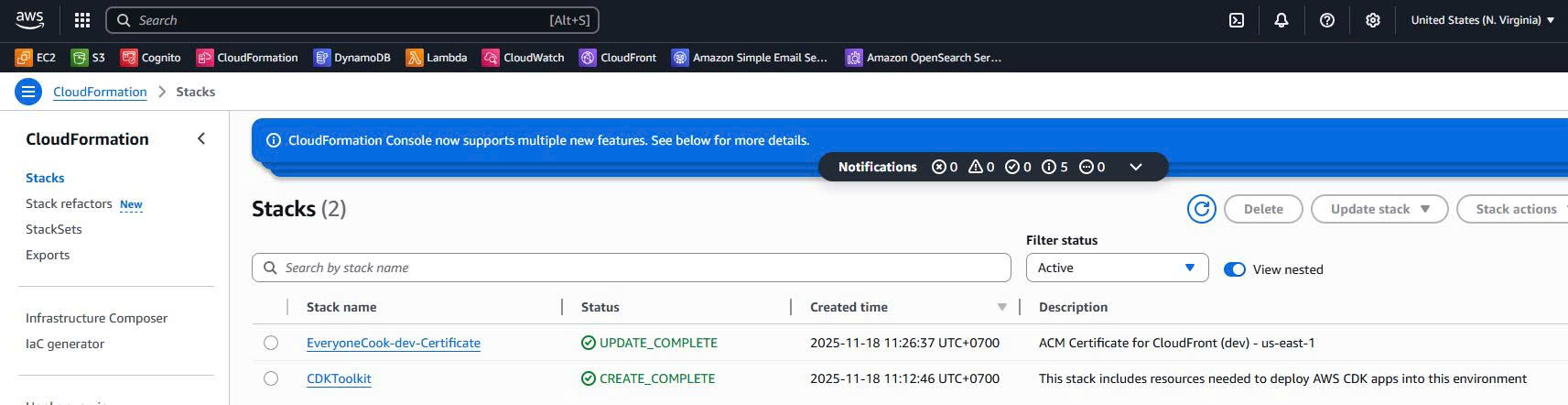
Confirm resources in the AWS Management Console. 3.1. Verify CloudFormation Stack
- Open CloudFormation Console
- Look for stack named
CDKToolkit - Status should be
CREATE_COMPLETE - Click on Resources tab to view created resources
** Screenshot Required:**
3.2. Verify S3 Bucket
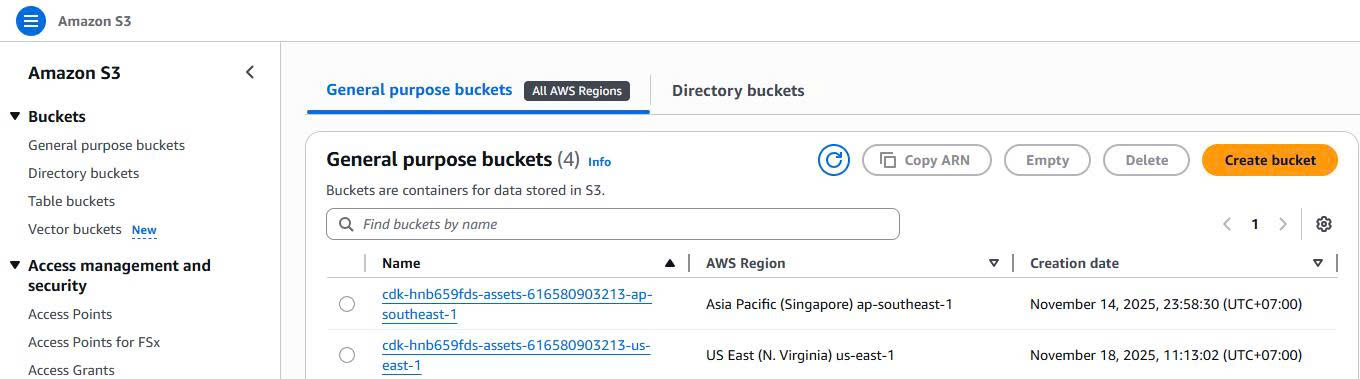
- Open S3 Console
- Find bucket:
cdk-hnb659fds-assets-{ACCOUNT-ID}-us-east-1 - Verify bucket properties:
- Versioning: Enabled
** Screenshot Required:**
3.3. Verify IAM Roles
- Open IAM Roles Console
- Search for:
cdk-hnb659fds - Verify the following roles exist:
cdk-hnb659fds-cfn-exec-role-{ACCOUNT-ID}-us-east-1cdk-hnb659fds-deploy-role-{ACCOUNT-ID}-us-east-1cdk-hnb659fds-file-publishing-role-{ACCOUNT-ID}-us-east-1cdk-hnb659fds-lookup-role-{ACCOUNT-ID}-us-east-1

Understanding Bootstrap Resources
S3 Bucket Details
The CDK assets bucket serves as a central repository for all deployment artifacts:
- Purpose: Stores CloudFormation templates, Lambda deployment packages, and static assets
- Lifecycle: Persists across deployments, enabling rollback capabilities
- Security: Encrypted at rest, bucket policies restrict access to authorized roles
- Naming: Deterministic naming based on account ID and region
1. CloudFormation Execution Role (cfn-exec-role)
- Used by CloudFormation to create/update/delete stack resources
- Has broad permissions to manage AWS resources
- Trust relationship with CloudFormation service
2. Deploy Role (deploy-role)
- Used by CDK CLI during
cdk deployoperations - Can assume the CloudFormation execution role
- Has permissions to upload assets and initiate deployments
3. File Publishing Role (file-publishing-role)
4. Image Publishing Role (image-publishing-role)
5. Lookup Role (lookup-role)
- Reads environment context (VPCs, subnets, etc.)
- Read-only permissions for resource lookups
- Used during synthesis for context queries
Cost Analysis
Bootstrap Resources Cost
One-time Setup:
- CloudFormation stack creation: Free
- IAM roles creation: Free
- SSM parameters: Free
Ongoing Monthly Costs:
| Resource | Usage | Cost (Estimated) |
|---|---|---|
| S3 Storage | < 1 GB (typical) | $0.023/GB = ~$0.02/month |
| S3 Requests | Minimal (GET/PUT) | ~$0.01/month |
| IAM Roles | No charge | $0.00 |
Total Estimated Cost: ~$0.03/month (negligible)
Note: For serverless applications, costs remain minimal as we only store Lambda deployment packages in S3.
Lab Completion Checklist
Ensure you have completed all steps and captured required screenshots:
- Step 1: Bootstrap command execution and success - [IMAGE HERE: bootstrap-success.png]
- Step 2: CLI verification results - [IMAGE HERE: bootstrap-verification-cli.png]
- Step 3.1: CloudFormation console - [IMAGE HERE: cloudformation-cdktoolkit.png]
- Step 3.2: S3 bucket console - [IMAGE HERE: s3-bucket-console.png]
- Step 3.3: IAM roles console - [IMAGE HERE: iam-roles-console.png]
Verified AWS account bootstrap status
Retrieved your AWS account ID
Executed CDK bootstrap command
Created CDKToolkit CloudFormation stack
Provisioned CDK assets S3 bucket
Created necessary IAM roles for CDK deployments
Verified bootstrap version in SSM Parameter Store
Understood the purpose and cost of each bootstrap resource In this lab, you successfully:
Executed CDK bootstrap command for your AWS account
Created CDKToolkit CloudFormation stack
Provisioned CDK assets S3 bucket for storing Lambda packages
Created necessary IAM roles for CDK deployments
Verified all resources via CLI and AWS Console
Your AWS account is now ready to deploy serverless CDK applications, including the infrastructure stacks for the EveryoneCook project.
- Prepare for infrastructure deployment