5.4.4 Auth Stack
Auth Stack - Authentication & User Management
Overview
The Auth Stack is the Phase 3 authentication layer of the EveryoneCook project. It manages user authentication, registration, and account security using AWS Cognito with custom Lambda triggers for enhanced user experience.
Deployment Order: This stack MUST be deployed after Core Stack and before Backend Stack.
Key Responsibilities
- Create Cognito User Pool with production-grade security settings
- Configure Cognito User Pool Client for web application
- Setup 5 Lambda triggers for custom authentication workflows
- Manage user registration, email verification, and login flows
- Handle user profile creation in DynamoDB (via PostConfirmation trigger)
What This Stack Includes
Cognito User Pool:
- Sign-in: Username or email
- Password policy: Min 12 chars (8 for dev), uppercase, lowercase, digits, symbols
- Email verification required
- MFA: Disabled (email + password only)
- Device tracking: Enabled (no MFA challenge)
- Standard attributes: username, email, given_name (fullName)
- Custom attributes: account_status, country
Cognito User Pool Client:
- Auth flows: USER_PASSWORD_AUTH, USER_SRP_AUTH
- OAuth flows: Authorization code grant (future social login)
- Token validity: Access/ID (1h), Refresh (30 days)
- Callback URLs: Environment-specific
Lambda Triggers (5 triggers):
- PreSignUp: Cleanup unverified users (24h expiration)
- CustomMessage: Customize email templates
- PostConfirmation: Create user profile in DynamoDB
- PreAuthentication: Check if user is banned/suspended
- PostAuthentication: Update last login timestamp
Architecture
┌─────────────────────────────────────────────────────────────────┐
│                    Auth Stack (Phase 3)                          │
│                                                                  │
│  ┌──────────────────────────────────────────────────────────┐  │
│  │  Cognito User Pool                                        │  │
│  │  ├─ Sign-in: Username or Email                          │  │
│  │  ├─ Password: Min 12 chars, strong policy              │  │
│  │  ├─ Email Verification: Required                       │  │
│  │  ├─ MFA: Disabled (email + password only)              │  │
│  │  ├─ Device Tracking: Enabled (no MFA)                  │  │
│  │  └─ Custom Attributes: account_status, country         │  │
│  └──────────────────────────────────────────────────────────┘  │
│                          │                                      │
│                          ▼                                      │
│  ┌──────────────────────────────────────────────────────────┐  │
│  │  Lambda Triggers (Custom Workflows)                       │  │
│  │                                                           │  │
│  │  1️⃣ PreSignUp                                            │  │
│  │     ├─ Check existing username/email                    │  │
│  │     ├─ Delete expired unverified users (>24h)          │  │
│  │     └─ Allow new registration                          │  │
│  │                                                           │  │
│  │  2️⃣ CustomMessage                                         │  │
│  │     ├─ Customize email verification template           │  │
│  │     ├─ Customize password reset template               │  │
│  │     └─ Add styling and branding                        │  │
│  │                                                           │  │
│  │  3️⃣ PostConfirmation                                      │  │
│  │     ├─ Create DynamoDB entities:                        │  │
│  │     │  ├─ Core Profile (PK=USER#{userId}, SK=PROFILE) │  │
│  │     │  ├─ Privacy Settings (SK=PRIVACY_SETTINGS)      │  │
│  │     │  └─ AI Preferences (SK=AI_PREFERENCES)          │  │
│  │     └─ Initialize user data                            │  │
│  │                                                           │  │
│  │  4️⃣ PreAuthentication                                     │  │
│  │     ├─ Check user account status                       │  │
│  │     ├─ Reject if banned/suspended                      │  │
│  │     └─ Allow login if active                           │  │
│  │                                                           │  │
│  │  5️⃣ PostAuthentication                                    │  │
│  │     ├─ Update lastLoginAt timestamp                    │  │
│  │     └─ Track user activity                             │  │
│  └──────────────────────────────────────────────────────────┘  │
│                          │                                      │
│                          ▼                                      │
│  ┌──────────────────────────────────────────────────────────┐  │
│  │  Cognito User Pool Client                                │  │
│  │  ├─ Client Type: Web (no secret)                        │  │
│  │  ├─ Auth Flows: Password, SRP                          │  │
│  │  ├─ OAuth: Authorization code grant                     │  │
│  │  ├─ Tokens: 1h access, 1h ID, 30d refresh             │  │
│  │  ├─ Callback: https://{env}.everyonecook.cloud        │  │
│  │  └─ Security: Token revocation, user enum protection   │  │
│  └──────────────────────────────────────────────────────────┘  │
└─────────────────────────────────────────────────────────────────┘
                          │
                          │ Exports
                          ▼
                   Backend Stack
        (API Gateway Cognito Authorizer)
Stack Configuration
File Structure
infrastructure/lib/stacks/
└── auth-stack.ts                           # Auth Stack (865 lines)

services/auth-module/triggers/
├── pre-signup.ts                          # PreSignUp trigger
├── custom-message.ts                      # CustomMessage trigger
├── post-confirmation.ts                   # PostConfirmation trigger
├── pre-authentication.ts                  # PreAuthentication trigger
└── post-authentication.ts                 # PostAuthentication trigger
Code Implementation Highlights
File: infrastructure/lib/stacks/auth-stack.ts
1. Cognito User Pool Creation
/**
 * Create Cognito User Pool with production-grade security
 */
private createUserPool(): cdk.aws_cognito.UserPool {
  const cognitoConfig = this.config.cognito;

  const userPool = new cdk.aws_cognito.UserPool(this, 'UserPool', {
    userPoolName: `EveryoneCook-${this.config.environment}`,

    // Sign-in configuration
    signInAliases: {
      username: true,
      email: true,
    },

    // Self sign-up enabled
    selfSignUpEnabled: true,

    // Standard attributes
    standardAttributes: {
      email: {
        required: true,
        mutable: false,  // Email cannot be changed
      },
      givenName: {
        required: true,  // fullName stored in given_name
        mutable: true,
      },
      birthdate: { required: false, mutable: true },
      gender: { required: false, mutable: true },
    },

    // Custom attributes
    customAttributes: {
      account_status: new cdk.aws_cognito.StringAttribute({
        mutable: true,
        minLen: 1,
        maxLen: 20,
      }),
      country: new cdk.aws_cognito.StringAttribute({
        mutable: true,
        minLen: 2,
        maxLen: 2,  // ISO 3166-1 alpha-2
      }),
    },

    // Password policy
    passwordPolicy: {
      minLength: 12,  // 8 for dev
      requireLowercase: true,
      requireUppercase: true,
      requireDigits: true,
      requireSymbols: true,
      tempPasswordValidity: cdk.Duration.days(7),
    },

    // Account recovery
    accountRecovery: cdk.aws_cognito.AccountRecovery.EMAIL_ONLY,

    // Email configuration (Cognito default)
    email: cdk.aws_cognito.UserPoolEmail.withCognito(),

    // Auto-verify email
    autoVerify: { email: true },

    // MFA: Disabled
    mfa: cdk.aws_cognito.Mfa.OFF,

    // Device tracking (no MFA challenge)
    deviceTracking: {
      challengeRequiredOnNewDevice: false,
      deviceOnlyRememberedOnUserPrompt: true,
    },

    // Email templates
    userVerification: {
      emailSubject: '🍳 Verify your Everyone Cook account',
      emailBody: 'Hello {username}, your verification code is: {####}',
      emailStyle: cdk.aws_cognito.VerificationEmailStyle.CODE,
    },

    // Deletion protection for production
    deletionProtection: this.config.environment === 'prod',
  });

  return userPool;
}
2. Lambda Triggers
/**
 * Create PostConfirmation Lambda Trigger
 *
 * Creates 3 DynamoDB entities after email verification:
 * 1. Core Profile (PK=USER#{userId}, SK=PROFILE)
 * 2. Privacy Settings (SK=PRIVACY_SETTINGS)
 * 3. AI Preferences (SK=AI_PREFERENCES)
 */
private createPostConfirmationTrigger(
  dynamoTable: cdk.aws_dynamodb.ITable
): cdk.aws_lambda.Function {
  const trigger = new cdk.aws_lambda.Function(this, 'PostConfirmationTrigger', {
    functionName: `EveryoneCook-${this.config.environment}-PostConfirmation`,
    runtime: cdk.aws_lambda.Runtime.NODEJS_20_X,
    handler: 'post-confirmation.handler',
    code: cdk.aws_lambda.Code.fromAsset(
      path.join(__dirname, '../../../services/auth-module/triggers/dist')
    ),
    memorySize: 512,
    timeout: cdk.Duration.seconds(30),
    environment: {
      DYNAMODB_TABLE_NAME: dynamoTable.tableName,
      ENVIRONMENT: this.config.environment,
    },
  });

  // Grant DynamoDB write permissions
  dynamoTable.grantReadWriteData(trigger);

  return trigger;
}

/**
 * Create PreSignUp Lambda Trigger
 *
 * Handles cleanup of unverified users:
 * - If user exists and UNCONFIRMED >24h → delete and allow new signup
 * - If user exists and UNCONFIRMED <24h → reject with "wait 24h" message
 * - If user doesn't exist → allow signup
 */
private createPreSignUpTrigger(): cdk.aws_lambda.Function {
  const trigger = new cdk.aws_lambda.Function(this, 'PreSignUpTrigger', {
    functionName: `EveryoneCook-${this.config.environment}-PreSignUp`,
    runtime: cdk.aws_lambda.Runtime.NODEJS_20_X,
    handler: 'pre-signup.handler',
    code: cdk.aws_lambda.Code.fromAsset(
      path.join(__dirname, '../../../services/auth-module/triggers/dist')
    ),
    memorySize: 256,
    timeout: cdk.Duration.seconds(10),
  });

  // Grant Cognito permissions
  trigger.addToRolePolicy(
    new cdk.aws_iam.PolicyStatement({
      effect: cdk.aws_iam.Effect.ALLOW,
      actions: ['cognito-idp:ListUsers', 'cognito-idp:AdminDeleteUser'],
      resources: [`arn:aws:cognito-idp:${this.region}:${this.account}:userpool/*`],
    })
  );

  return trigger;
}
3. User Pool Client
/**
 * Create Cognito User Pool Client for web application
 */
private createUserPoolClient(): cdk.aws_cognito.UserPoolClient {
  const callbackUrls = this.getCallbackUrls();
  const logoutUrls = this.getLogoutUrls();

  const userPoolClient = new cdk.aws_cognito.UserPoolClient(
    this, 'UserPoolClient', {
      userPoolClientName: `EveryoneCook-Web-Client-${this.config.environment}`,
      userPool: this.userPool,

      // Auth flows
      authFlows: {
        userPassword: true,  // USER_PASSWORD_AUTH
        userSrp: true,       // USER_SRP_AUTH (Secure Remote Password)
        custom: false,
        adminUserPassword: false,
      },

      // OAuth configuration (future social login)
      oAuth: {
        flows: {
          authorizationCodeGrant: true,
          implicitCodeGrant: false,
          clientCredentials: false,
        },
        scopes: [
          cdk.aws_cognito.OAuthScope.EMAIL,
          cdk.aws_cognito.OAuthScope.OPENID,
          cdk.aws_cognito.OAuthScope.PROFILE,
        ],
        callbackUrls: callbackUrls,
        logoutUrls: logoutUrls,
      },

      // Token validity
      accessTokenValidity: cdk.Duration.hours(1),
      idTokenValidity: cdk.Duration.hours(1),
      refreshTokenValidity: cdk.Duration.days(30),

      // Read attributes
      readAttributes: new cdk.aws_cognito.ClientAttributes()
        .withStandardAttributes({
          email: true,
          emailVerified: true,
          givenName: true,
        })
        .withCustomAttributes('account_status', 'country'),

      // Security settings
      preventUserExistenceErrors: true,  // Prevent enumeration attacks
      enableTokenRevocation: true,       // Allow token revocation
      generateSecret: false,             // No secret for web apps
    }
  );

  return userPoolClient;
}
Key Configuration Details
1. User Registration Flow
Registration Process:
1. User signs up → PreSignUp trigger
   ├─ Check if username/email exists
   ├─ If UNCONFIRMED >24h: Delete old user
   ├─ If UNCONFIRMED <24h: Reject with "wait 24h"
   └─ Allow registration

2. User receives verification email → CustomMessage trigger
   ├─ Customize email template
   └─ Send verification code

3. User verifies email → PostConfirmation trigger
   ├─ Create DynamoDB entities:
   │  ├─ Core Profile (username, email, fullName, etc.)
   │  ├─ Privacy Settings (default: private)
   │  └─ AI Preferences (default settings)
   └─ User account ready

4. User logs in → PreAuthentication trigger
   ├─ Check account_status
   ├─ If banned/suspended: Reject login
   └─ Allow login

5. Login successful → PostAuthentication trigger
   └─ Update lastLoginAt timestamp
2. Password Policy
Environments:
| Environment | Min Length | Requirements |
|---|---|---|
| Dev | 8 chars | Uppercase, lowercase, digits, symbols |
| Staging | 12 chars | Uppercase, lowercase, digits, symbols |
| Prod | 12 chars | Uppercase, lowercase, digits, symbols |
Example Valid Passwords:
MyP@ssw0rd123(12 chars)Str0ng!Pass(11 chars, invalid for prod/staging)
3. Token Validity
| Token Type | Validity | Purpose |
|---|---|---|
| Access Token | 1 hour | API authorization |
| ID Token | 1 hour | User identity claims |
| Refresh Token | 30 days | Renew access/ID tokens |
Token Refresh Flow:
Access token expires (1h) → Use refresh token → Get new access/ID tokens
Refresh token expires (30d) → User must login again
4. Lambda Trigger Details
PreSignUp Trigger
Purpose: Prevent “username already taken” errors for unverified users
Logic:
if (userExists && userStatus === 'UNCONFIRMED') {
  const hoursSinceCreation = (now - userCreationDate) / (1000 * 60 * 60);

  if (hoursSinceCreation > 24) {
    // Delete expired unverified user
    await deleteUser(username);
    return allowSignUp();
  } else {
    // User still has time to verify
    return rejectSignUp(`Please wait ${24 - hoursSinceCreation}h to register again`);
  }
} else {
  return allowSignUp();
}
PostConfirmation Trigger
DynamoDB Entities Created:
// 1. Core Profile
{
  PK: "USER#{userId}",
  SK: "PROFILE",
  username: "john_doe",
  email: "john@example.com",
  fullName: "John Doe",
  account_status: "active",
  createdAt: "2025-01-01T00:00:00Z",
  // ... other fields
}

// 2. Privacy Settings
{
  PK: "USER#{userId}",
  SK: "PRIVACY_SETTINGS",
  profileVisibility: "private",
  showEmail: false,
  allowMessages: "friends",
  // ... other settings
}

// 3. AI Preferences
{
  PK: "USER#{userId}",
  SK: "AI_PREFERENCES",
  aiEnabled: true,
  preferredLanguage: "en",
  dietaryRestrictions: [],
  // ... other preferences
}
Stack Outputs
After deployment, the stack exports the following values:
| Output Name | Value | Used By |
|---|---|---|
UserPoolId | ap-southeast-1_XXXXXXXXX | Backend Stack (Authorizer) |
UserPoolArn | arn:aws:cognito-idp:... | Lambda IAM policies |
UserPoolClientId | 1234567890abcdef | Frontend (Amplify config) |
CustomMessageFunctionArn | arn:aws:lambda:... | Monitoring |
PostConfirmationFunctionArn | arn:aws:lambda:... | Monitoring |
PreAuthenticationFunctionArn | arn:aws:lambda:... | Monitoring |
PostAuthenticationFunctionArn | arn:aws:lambda:... | Monitoring |
Deployment Steps
Step 1: Build Lambda Triggers
Before deploying, compile Lambda triggers to JavaScript:
cd D:\Project_AWS\everyonecook\services\auth-module\triggers

# Install dependencies
npm install

# Build TypeScript to JavaScript
npm run build
Expected output:
> auth-module-triggers@1.0.0 build
> tsc

Compiled successfully to dist/
Step 2: Verify Prerequisites
- Core Stack successfully deployed
- DynamoDB table exists
- Lambda triggers built to
dist/folder
Step 3: Deploy Auth Stack
Navigate to infrastructure directory:
cd D:\Project_AWS\everyonecook\infrastructure
Deploy Auth Stack to ap-southeast-1:
# Deploy Auth Stack
npx cdk deploy EveryoneCook-dev-Auth --context environment=dev
Expected output:
✨  Synthesis time: 7.23s

EveryoneCook-dev-Auth: deploying...
[████████████████████████████████████████] (9/9)

EveryoneCook-dev-Auth: creating CloudFormation changeset...

   EveryoneCook-dev-Auth

✨  Deployment time: 180.45s

Outputs:
EveryoneCook-dev-Auth.UserPoolId = ap-southeast-1_a1B2c3D4e
EveryoneCook-dev-Auth.UserPoolClientId = 1a2b3c4d5e6f7g8h9i0j
EveryoneCook-dev-Auth.UserPoolArn = arn:aws:cognito-idp:ap-southeast-1:616580903213:userpool/...
EveryoneCook-dev-Auth.PostConfirmationFunctionArn = arn:aws:lambda:ap-southeast-1:...
EveryoneCook-dev-Auth.PreAuthenticationFunctionArn = arn:aws:lambda:ap-southeast-1:...

Stack ARN:
arn:aws:cloudformation:ap-southeast-1:616580903213:stack/EveryoneCook-dev-Auth/...
Step 4: Verify in AWS Console
Navigate to Cognito User Pool
- Open AWS Console → ap-southeast-1 region
- Go to Amazon Cognito > User pools
- Find
EveryoneCook-dev
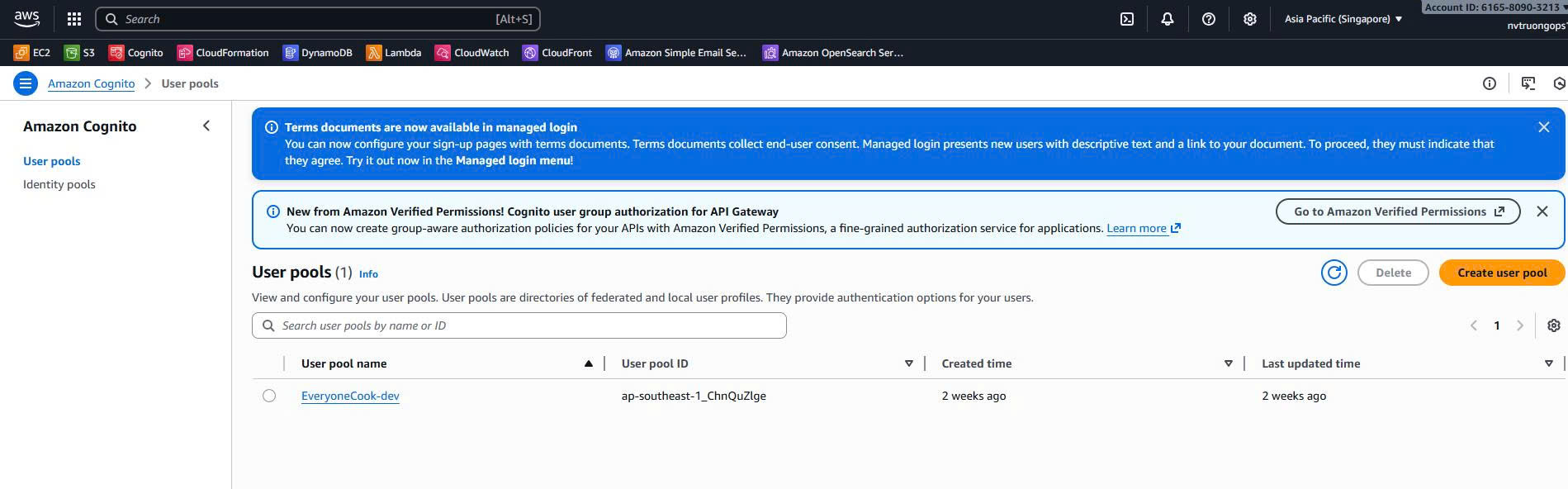 Cognito User Pool showing sign-in options (username/email), MFA disabled, password policy, and deletion protection
Verify:
- Sign-in: Username or Email
- MFA: Disabled
- Password policy: Configured
- Email verification: Required
Verify User Pool Configuration
Click on the User Pool to view details:
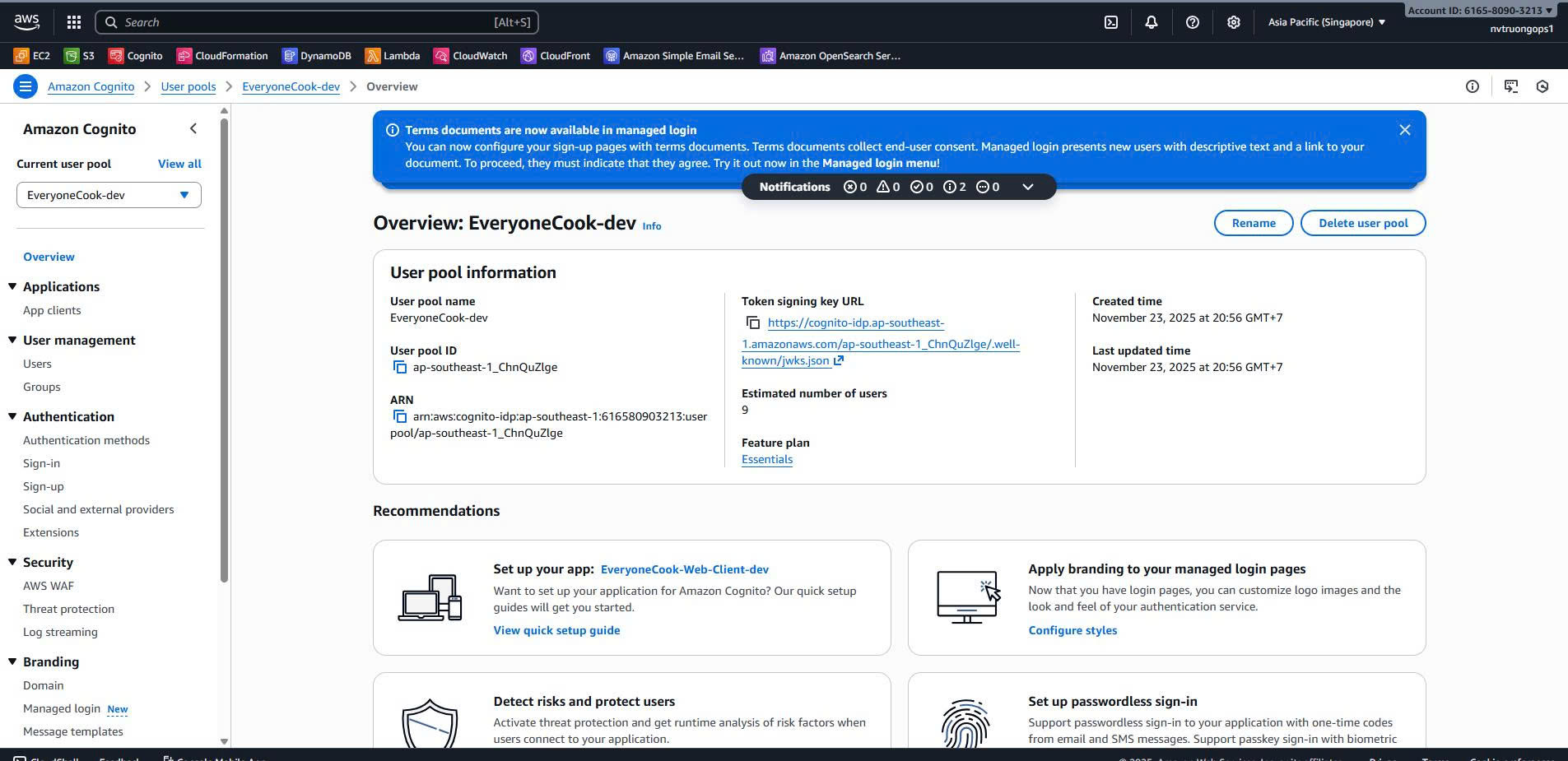 User Pool configuration showing authentication settings, attributes, password policy, and security features
Check:
- Sign-in experience: Username and Email enabled
- User attributes: email, given_name (required), birthdate, gender (optional)
- Custom attributes: account_status, country
- Password policy: Min 12 chars, requires uppercase, lowercase, digits, symbols
- MFA: Off
- Device tracking: Enabled
Verify Lambda Triggers
Go to User pool properties > Lambda triggers:
 Lambda triggers configured for Pre sign-up, Custom message, Post confirmation, Pre authentication, and Post authentication
Verify 5 triggers:
- Pre sign-up:
EveryoneCook-dev-PreSignUp - Custom message:
EveryoneCook-dev-CustomMessage - Post confirmation:
EveryoneCook-dev-PostConfirmation - Pre authentication:
EveryoneCook-dev-PreAuthentication - Post authentication:
EveryoneCook-dev-PostAuthentication
Verify User Pool Client
Go to App integration > App clients:
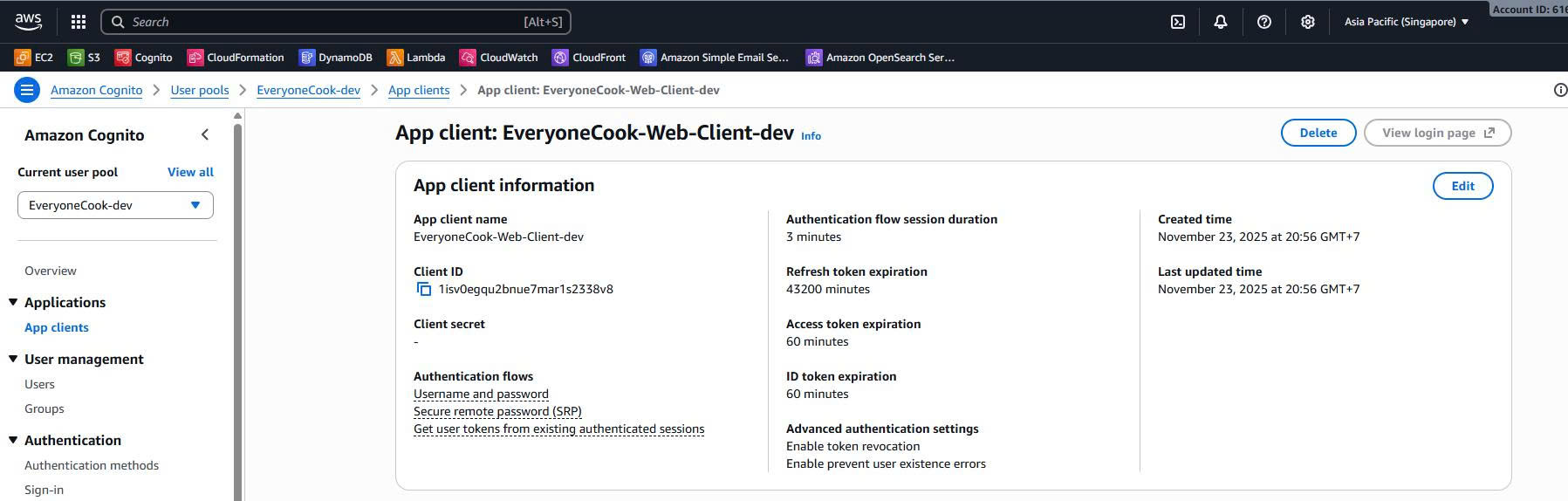 User Pool Client showing auth flows, OAuth settings, token validity, callback URLs, and security settings
Verify:
- Client type: Public (no secret)
- Auth flows: USER_PASSWORD_AUTH, USER_SRP_AUTH
- OAuth flows: Authorization code grant
- Callback URLs: Environment-specific
- Token validity: 1h access, 1h ID, 30d refresh
Navigate to Lambda Functions
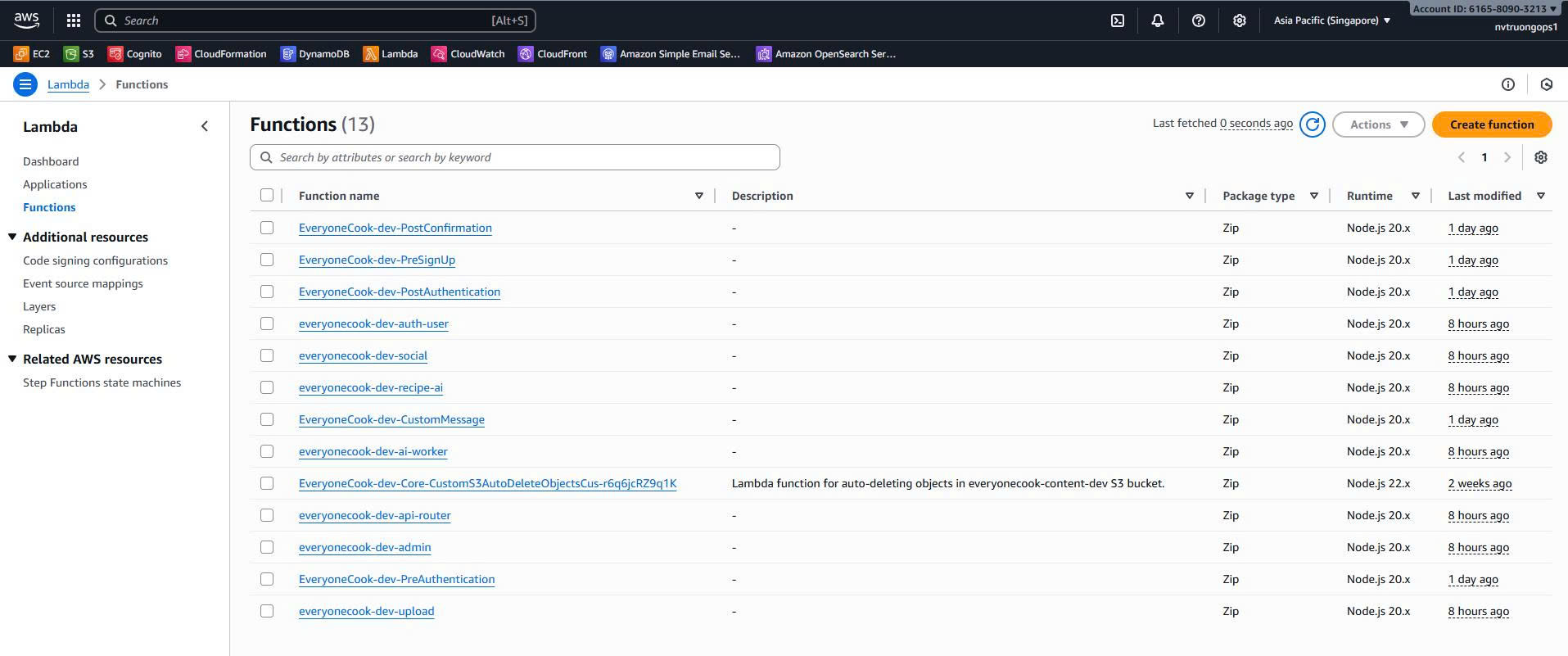
Go to Lambda > Functions, find Auth triggers:
Lambda functions showing all 5 Cognito triggers with runtime Node.js 20.x, memory 256-512 MB, and timeout 10-30s
Verify:
- All 5 Lambda functions created
- Runtime: Node.js 20.x
- Environment variables configured
- CloudWatch log groups created
Check Lambda Permissions
Click on a Lambda function → Configuration > Permissions:
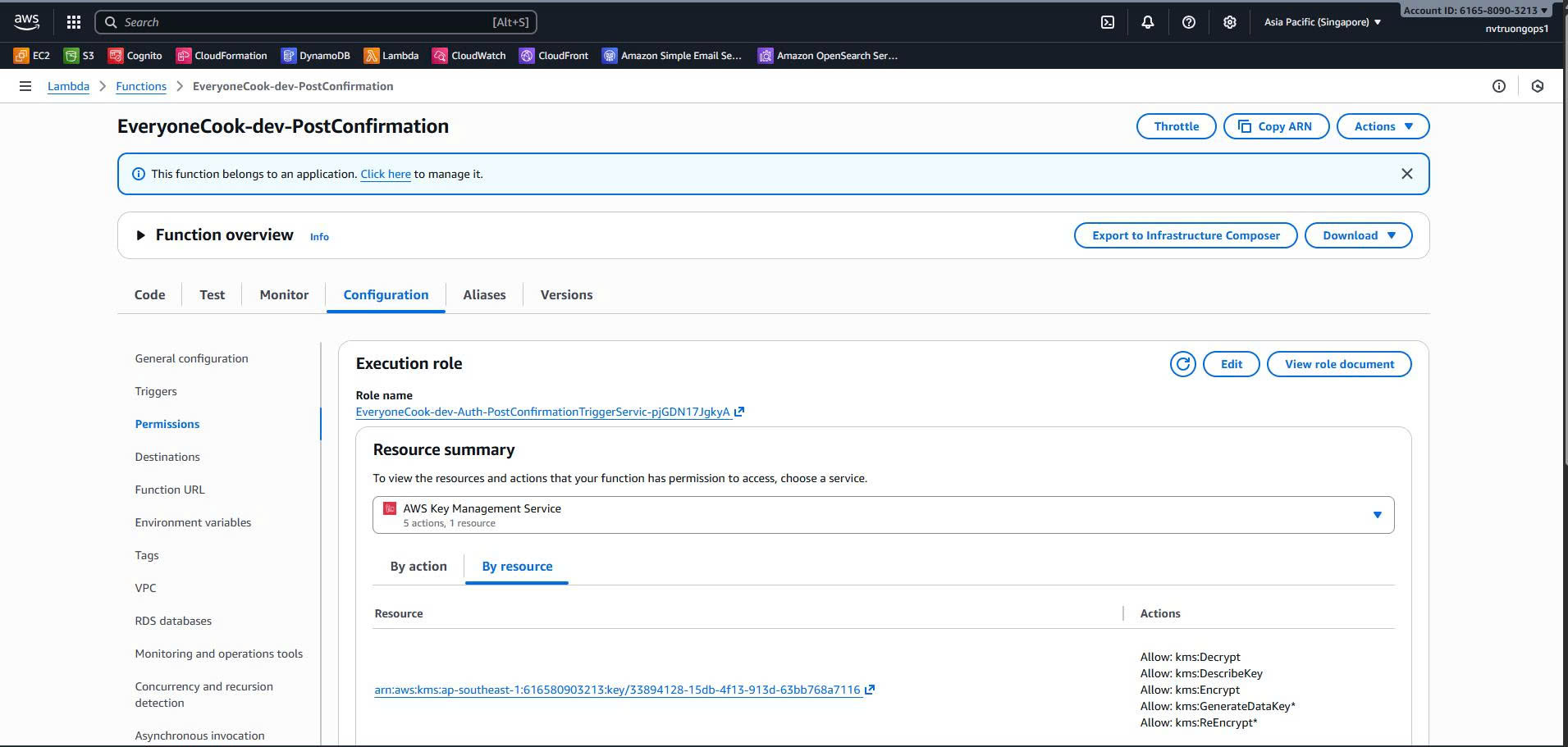 Lambda execution role showing permissions for DynamoDB (PostConfirmation), Cognito (PreSignUp), and CloudWatch Logs
Expected permissions:
- PostConfirmation: DynamoDB read/write
- PreAuthentication: DynamoDB read
- PostAuthentication: DynamoDB read/write
- PreSignUp: Cognito ListUsers, AdminDeleteUser
- All triggers: CloudWatch Logs write
Cost Breakdown
Monthly Costs (Dev Environment)
| Resource | Configuration | Monthly Cost | Notes |
|---|---|---|---|
| Cognito User Pool | <50 MAU | $0 | First 50K MAU free |
| Lambda Triggers | 5 functions, low invocations | $0-1 | Free tier covers most |
| CloudWatch Logs | 7-day retention, 5 log groups | $0.50 | ~1GB logs |
| Total (Estimated) | ~$0.50-1.50/month | Very low for dev |
Cost Notes
- Cognito: First 50,000 MAU free, then $0.0055/MAU
- Lambda: 1M requests/month free, then $0.20 per 1M
- CloudWatch Logs: $0.50/GB ingested, $0.03/GB stored
- No MFA charges: MFA disabled saves $0.05/MAU
Production Estimate (1000 MAU):
- Cognito: 1000 MAU × $0.0055 = $5.50/month
- Lambda triggers: ~5000 invocations/month = $0 (free tier)
- CloudWatch Logs: $1-2/month
- Total: ~$7-8/month
Cross-Stack Dependencies
Imports from Previous Stacks
From Core Stack:
dynamoTable: cdk.Fn.importValue('EveryoneCook-dev-DynamoDBTableName')
Exports Used By Other Stacks
Backend Stack imports:
- User Pool ID (for Cognito Authorizer)
- User Pool ARN (for API Gateway)
- User Pool Client ID (for frontend config)
Dependency Flow
Core Stack → DynamoDB Table
    │
    ▼
Auth Stack (creates Cognito + Lambda triggers)
    │
    ├─► User Pool ID → Backend Stack (API Gateway Authorizer)
    ├─► User Pool Client ID → Frontend (Amplify config)
    └─► Lambda triggers → User management workflows
Validation Checklist
Before proceeding to Backend Stack deployment:
- Auth Stack successfully deployed to ap-southeast-1
- Cognito User Pool exists with correct settings
- 5 Lambda triggers configured and attached
- User Pool Client created with OAuth settings
- Lambda functions have correct IAM permissions
- CloudWatch log groups created (7-day retention)
- Stack outputs exported successfully
- Lambda trigger code built to
dist/folder
Testing
Test User Registration Flow
Test sign-up with Cognito console:
Go to Cognito > User pools > EveryoneCook-dev > Users > Create user
Create a test user:
Username: testuser01
Email: your-email@example.com
Full Name: Test User
Temporary Password: TempP@ss123
Verify email sent:
Check your email for verification code.
Check Lambda logs:
# View PostConfirmation logs
aws logs tail /aws/lambda/EveryoneCook-dev-PostConfirmation --follow --region ap-southeast-1
Verify DynamoDB entries:
# Query user profile
aws dynamodb query \
  --table-name EveryoneCook-dev-v2 \
  --key-condition-expression "PK = :pk" \
  --expression-attribute-values '{":pk":{"S":"USER#testuser01"}}' \
  --region ap-southeast-1
Expected: 3 items (PROFILE, PRIVACY_SETTINGS, AI_PREFERENCES)
Test Authentication Flow
Login with test user:
Use AWS CLI to authenticate:
aws cognito-idp initiate-auth \
  --auth-flow USER_PASSWORD_AUTH \
  --client-id <USER_POOL_CLIENT_ID> \
  --auth-parameters USERNAME=testuser01,PASSWORD=<password> \
  --region ap-southeast-1
Check PreAuthentication logs:
aws logs tail /aws/lambda/EveryoneCook-dev-PreAuthentication --follow --region ap-southeast-1Check PostAuthentication logs:
aws logs tail /aws/lambda/EveryoneCook-dev-PostAuthentication --follow --region ap-southeast-1
Test PreSignUp Cleanup
Create unverified user:
Sign up a user but don’t verify email.
Wait 24 hours (or modify trigger code to 1 minute for testing)
Try to sign up again with same username:
PreSignUp trigger should delete old user and allow new signup.
Next Steps
After successfully deploying the Auth Stack:
➡️ 5.4.5 Backend Stack - Create API Gateway, Lambda functions, and SQS queues
The Backend Stack will:
- Create API Gateway REST API with Cognito Authorizer
- Create 5 Lambda functions (auth, social, recipe, AI, admin)
- Create 6 SQS queues for async processing
- Create 6 worker Lambda functions
- Import User Pool ID from Auth Stack
- Configure API Gateway custom domain
References
- Source Code:
infrastructure/lib/stacks/auth-stack.ts - Lambda Triggers:
services/auth-module/triggers/ - Base Stack:
infrastructure/lib/base-stack.ts - Environment Config:
infrastructure/config/environment.ts - AWS Documentation: