5.4.6 Frontend Stack
Frontend Stack - AWS Amplify Hosting
Overview
The Frontend Stack handles Next.js 15 application deployment using AWS Amplify. Unlike other stacks managed by CDK, the Frontend is deployed through Amplify Console with GitLab integration for automatic deployment.
Deployment Method: AWS Amplify Console (not a CDK stack)
⚠️ Important Note: Frontend deployment is performed separately through Amplify Console. See details at 5.10 Deploy to Amplify.
Key Responsibilities
- Host Next.js 15 SSR application
- Automatic deployment from GitLab repository
- Custom domain configuration with Route 53
- Automatic SSL certificate via ACM
- Global CDN distribution
- Environment variables management
What This Stack Includes
Next.js Application:
- Framework: Next.js 15 with React 18
- Rendering: Standalone output mode (SSR)
- Styling: Tailwind CSS + Flowbite components
- State Management: React Context API
- Authentication: AWS Amplify Auth (Cognito integration)
AWS Amplify Features:
- Automatic build and deploy from Git
- Server-side rendering (SSR) support
- Custom domain with HTTPS
- CDN caching and compression
- Environment variables injection
- GitLab CI/CD integration
Architecture
┌─────────────────────────────────────────────────────────────────┐
│                    GitLab Repository                             │
│                   (everyonecook/frontend)                        │
│                                                                  │
│  Push to main/dev branch                                        │
└──────────────────────────┬──────────────────────────────────────┘
                           │ Webhook Trigger
                           ▼
┌─────────────────────────────────────────────────────────────────┐
│              AWS Amplify (Hosting + CI/CD)                       │
│                                                                  │
│  ┌──────────────────────────────────────────────────────────┐  │
│  │  Build Pipeline (Auto-triggered)                          │  │
│  │  1. Clone repository from GitLab                         │  │
│  │  2. npm install (with legacy peer deps)                  │  │
│  │  3. Inject environment variables → .env.production       │  │
│  │  4. npm run build (Next.js standalone build)             │  │
│  │  5. Deploy to Amplify CDN                                │  │
│  └──────────────────────────────────────────────────────────┘  │
│                                                                  │
│  ┌──────────────────────────────────────────────────────────┐  │
│  │  Hosting Configuration                                    │  │
│  │  • CDN Distribution (CloudFront)                         │  │
│  │  • SSR Lambda@Edge functions                             │  │
│  │  • Custom domain: dev.everyonecook.cloud                 │  │
│  │  • SSL Certificate (ACM - auto-provisioned)              │  │
│  │  • Custom headers (security)                             │  │
│  │  • Custom rewrites (Next.js routing)                     │  │
│  └──────────────────────────────────────────────────────────┘  │
└──────────────────────────┬──────────────────────────────────────┘
                           │
                           ▼
┌─────────────────────────────────────────────────────────────────┐
│                    Route 53 (DNS)                                │
│  dev.everyonecook.cloud → A Record → Amplify CDN               │
│  www.dev.everyonecook.cloud → CNAME → Amplify CDN              │
└─────────────────────────────────────────────────────────────────┘
                           │
                           ▼
┌─────────────────────────────────────────────────────────────────┐
│                End Users (Global)                                │
│  Access via: https://dev.everyonecook.cloud                     │
└─────────────────────────────────────────────────────────────────┘
Frontend Configuration
File Structure
frontend/
├── amplify.yml                 # Amplify build configuration
├── next.config.js              # Next.js configuration
├── package.json                # Dependencies & scripts
├── .env.example               # Environment variables template
├── app/                        # Next.js App Router
│   ├── layout.tsx             # Root layout
│   ├── page.tsx               # Home page
│   ├── auth/                  # Authentication pages
│   ├── profile/               # User profile
│   ├── recipes/               # Recipe pages
│   └── ...
├── components/                 # Reusable React components
├── contexts/                   # React Context providers
├── hooks/                      # Custom React hooks
├── lib/                        # Utility functions
├── services/                   # API service layer
└── types/                      # TypeScript definitions
1. Amplify Build Configuration
File: amplify.yml (root directory)
⚠️ Important: Amplify uses the amplify.yml file at the repository root, not in the frontend/ folder.
version: 1
applications:
  - frontend:
      phases:
        preBuild:
          commands:
            - export HUSKY=0
            - npm install --legacy-peer-deps --ignore-scripts
        build:
          commands:
            - echo "=== Creating .env.production from Amplify env vars ==="
            - rm -f .env.production
            - env | grep -e NEXT_PUBLIC_ > .env.production || true
            - echo "=== .env.production content ==="
            - cat .env.production
            - echo "=== Building frontend ==="
            - npm run build
      artifacts:
        baseDirectory: .next
        files:
          - '**/*'
      cache:
        paths:
          - node_modules/**/*
          - .next/cache/**/*
    appRoot: frontend
Additional Configuration in frontend/amplify.yml:
The frontend/amplify.yml file contains additional security headers and custom rewrites (can be merged into root amplify.yml if needed):
customHeaders:
  - pattern: '**/*'
    headers:
      - key: 'Strict-Transport-Security'
        value: 'max-age=31536000; includeSubDomains'
      - key: 'X-Content-Type-Options'
        value: 'nosniff'
      - key: 'X-Frame-Options'
        value: 'DENY'
      - key: 'X-XSS-Protection'
        value: '1; mode=block'

customRules:
  # Handle dynamic routes [id] - rewrite non-file requests to Next.js
  - source: '</^[^.]+$|\.(?!(css|gif|ico|jpg|jpeg|js|json|png|txt|svg|woff|woff2|ttf|map|webp|avif)$)([^.]+$)/>'
    target: /index.html
    status: '200'
  # Preserve static assets
  - source: '/_next/<*>'
    target: '/_next/<*>'
    status: '200'
  - source: '/api/<*>'
    target: '/api/<*>'
    status: '200'
Key Points:
appRoot: frontend: Source code in thefrontend/directory- Build artifacts:
.nextdirectory (Next.js standalone build) - Root
amplify.yml: Build configuration only - Frontend
amplify.yml: Includes security headers + custom rewrites - Recommendation: Merge customHeaders and customRules into root
amplify.ymlfor centralized configuration
2. Next.js Configuration
File: frontend/next.config.js
/** @type {import('next').NextConfig} */
const nextConfig = {
  reactStrictMode: true,

  // Output mode for Amplify SSR deployment
  output: 'standalone',

  // Performance optimizations
  poweredByHeader: false,
  compress: true,
  trailingSlash: false,

  // Image optimization
  images: {
    remotePatterns: [
      {
        protocol: 'https',
        hostname: 'cdn-dev.everyonecook.cloud',
        pathname: '/**',
      },
    ],
    formats: ['image/avif', 'image/webp'],
    deviceSizes: [640, 750, 828, 1080, 1200, 1920, 2048, 3840],
  },

  // Optimize bundle
  experimental: {
    optimizePackageImports: ['react-icons', 'flowbite-react', 'aws-amplify'],
    optimizeCss: true,
  },

  // Environment variables (fallback values)
  env: {
    NEXT_PUBLIC_API_URL: process.env.NEXT_PUBLIC_API_URL || 'https://api-dev.everyonecook.cloud',
    NEXT_PUBLIC_CDN_URL: process.env.NEXT_PUBLIC_CDN_URL || 'https://cdn-dev.everyonecook.cloud',
    NEXT_PUBLIC_COGNITO_USER_POOL_ID: process.env.NEXT_PUBLIC_COGNITO_USER_POOL_ID,
    NEXT_PUBLIC_COGNITO_CLIENT_ID: process.env.NEXT_PUBLIC_COGNITO_CLIENT_ID,
    NEXT_PUBLIC_COGNITO_REGION: process.env.NEXT_PUBLIC_COGNITO_REGION || 'ap-southeast-1',
  },
};

module.exports = nextConfig;
Key Points:
output: 'standalone': Optimized build for Amplify- Image optimization: Support for AVIF, WebP formats
- CDN integration: Load images from CloudFront CDN
- Environment variables: Injected from Amplify Console
3. Dependencies
File: frontend/package.json
{
  "name": "everyonecook-frontend",
  "version": "1.0.0",
  "scripts": {
    "dev": "next dev --turbo",
    "build": "next build",
    "start": "next start"
  },
  "dependencies": {
    "next": "^15.0.0",
    "react": "^18.3.0",
    "react-dom": "^18.3.0",
    "aws-amplify": "^6.15.8",
    "@aws-amplify/auth": "^6.17.0",
    "axios": "^1.13.2",
    "flowbite-react": "^0.7.0",
    "react-icons": "^5.0.1"
  },
  "devDependencies": {
    "typescript": "^5.3.0",
    "tailwindcss": "^3.4.18",
    "autoprefixer": "^10.4.22"
  }
}
Key Dependencies:
- Next.js 15: Latest SSR framework
- AWS Amplify: Authentication & API integration
- Flowbite React: UI component library
- Tailwind CSS: Utility-first CSS framework
4. Environment Variables
File: frontend/.env.example
# API Configuration
NEXT_PUBLIC_API_URL=https://api-dev.everyonecook.cloud

# CDN Configuration
NEXT_PUBLIC_CDN_URL=https://cdn-dev.everyonecook.cloud

# AWS Cognito Configuration
NEXT_PUBLIC_COGNITO_USER_POOL_ID=ap-southeast-1_XXXXXXXXX
NEXT_PUBLIC_COGNITO_CLIENT_ID=xxxxxxxxxxxxxxxxxxxxx
NEXT_PUBLIC_COGNITO_REGION=ap-southeast-1

# Environment
NEXT_PUBLIC_ENV=development
Important: These variables must be configured in Amplify Console > Environment Variables.
Deployment Configuration
Domain Configuration
| Environment | Frontend Domain | Backend API | CDN |
|---|---|---|---|
| Dev | dev.everyonecook.cloud | api-dev.everyonecook.cloud | cdn-dev.everyonecook.cloud |
| Staging | staging.everyonecook.cloud | api-staging.everyonecook.cloud | cdn-staging.everyonecook.cloud |
| Prod | everyonecook.cloud | api.everyonecook.cloud | cdn.everyonecook.cloud |
Amplify Configuration
Build Settings:
- Node.js version: 18.x (auto-detected)
- Build timeout: 15 minutes
- Build image: Amazon Linux 2023
- Cache: node_modules + .next/cache
Deployment Settings:
- Auto-deploy: Enabled (on Git push)
- Branch:
main(prod),dev(development) - Build mode: Server-side rendering (SSR)
Integration with Other Stacks
Dependencies
Frontend requires outputs from:
DNS Stack (Phase 1):
- Route 53 Hosted Zone ID
- Domain name configuration
Certificate Stack (Phase 1.5):
- ACM Certificate cho custom domain (CloudFront - us-east-1)
- Amplify sẽ tự động provision certificate
Auth Stack (Phase 3):
COGNITO_USER_POOL_ID: User Pool IDCOGNITO_CLIENT_ID: App Client IDCOGNITO_REGION: AWS Region
Backend Stack (Phase 4):
API_URL: API Gateway custom domain- API endpoints configuration
Core Stack (Phase 2):
CDN_URL: CloudFront distribution domain- S3 bucket for image uploads
Cross-Stack References
Frontend uses environment variables to connect with backend:
// services/api.ts
const API_BASE_URL = process.env.NEXT_PUBLIC_API_URL; // From Backend Stack
const CDN_URL = process.env.NEXT_PUBLIC_CDN_URL;       // From Core Stack

// lib/auth.ts
const cognitoConfig = {
  userPoolId: process.env.NEXT_PUBLIC_COGNITO_USER_POOL_ID,     // From Auth Stack
  userPoolClientId: process.env.NEXT_PUBLIC_COGNITO_CLIENT_ID,  // From Auth Stack
  region: process.env.NEXT_PUBLIC_COGNITO_REGION,
};
Deployment Process
Prerequisites
Before deploying the frontend, ensure the following are completed:
- ✅ DNS Stack deployed (Route 53 Hosted Zone)
- ✅ Core Stack deployed (S3 + CloudFront CDN)
- ✅ Auth Stack deployed (Cognito User Pool)
- ✅ Backend Stack deployed (API Gateway + Lambda)
- ✅ GitLab repository configured
- ✅ AWS Amplify connected to GitLab
Deployment Steps
Frontend is deployed through Amplify Console, NOT through CDK.
For deployment details, see: 5.10 Deploy to Amplify
Summary of steps:
- Create Amplify App via AWS Console
- Connect GitLab repository (everyonecook)
- Configure build settings (amplify.yml)
- Set environment variables (Cognito, API, CDN URLs)
- Configure custom domain (dev.everyonecook.cloud)
- Deploy automatically on Git push
⚠️ Note: After successful deployment, you need to:
- ✅ Verify DNS records in Route 53
- ✅ Test SSL certificate
- ✅ Verify custom domain is working
- ✅ Test authentication flow with Cognito
Verification
1. Check Amplify Console
📸 Screenshot Required: AWS Console > Amplify > App Overview
Verify:
- Build status: Success
- Deployment status: Live
- Custom domain: Active
- SSL certificate: Issued
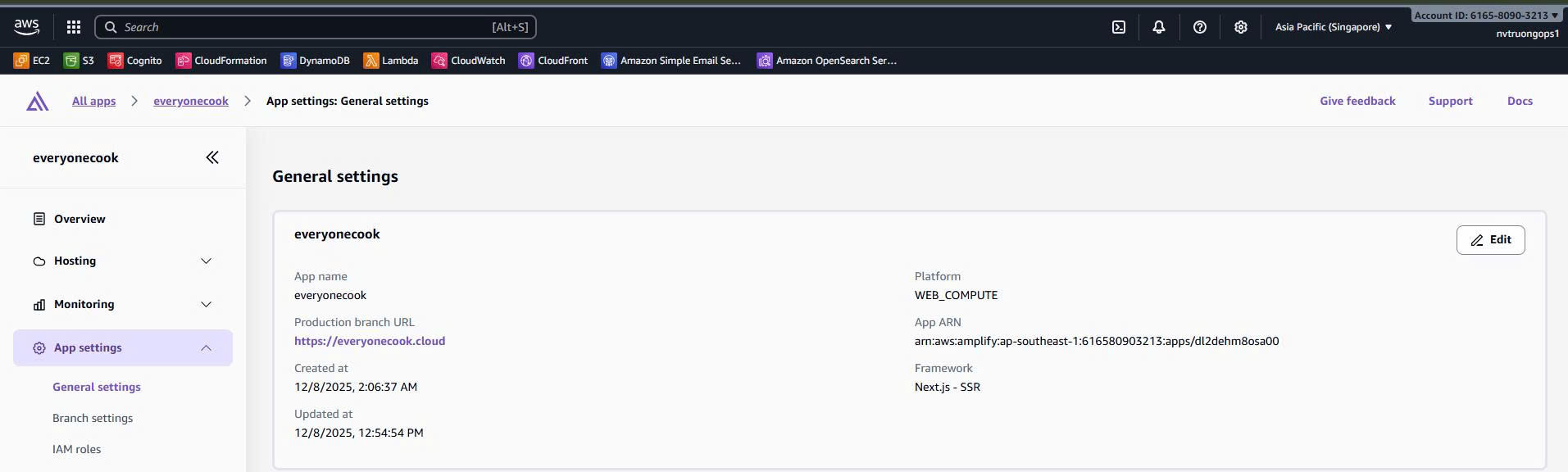 Screenshot: Amplify Console showing successful deployment
2. Check Route 53 DNS
📸 Screenshot Required: AWS Console > Route 53 > Hosted Zone
Verify DNS records:
dev.everyonecook.cloud     A      → Amplify CDN
www.dev.everyonecook.cloud CNAME  → Amplify CDN
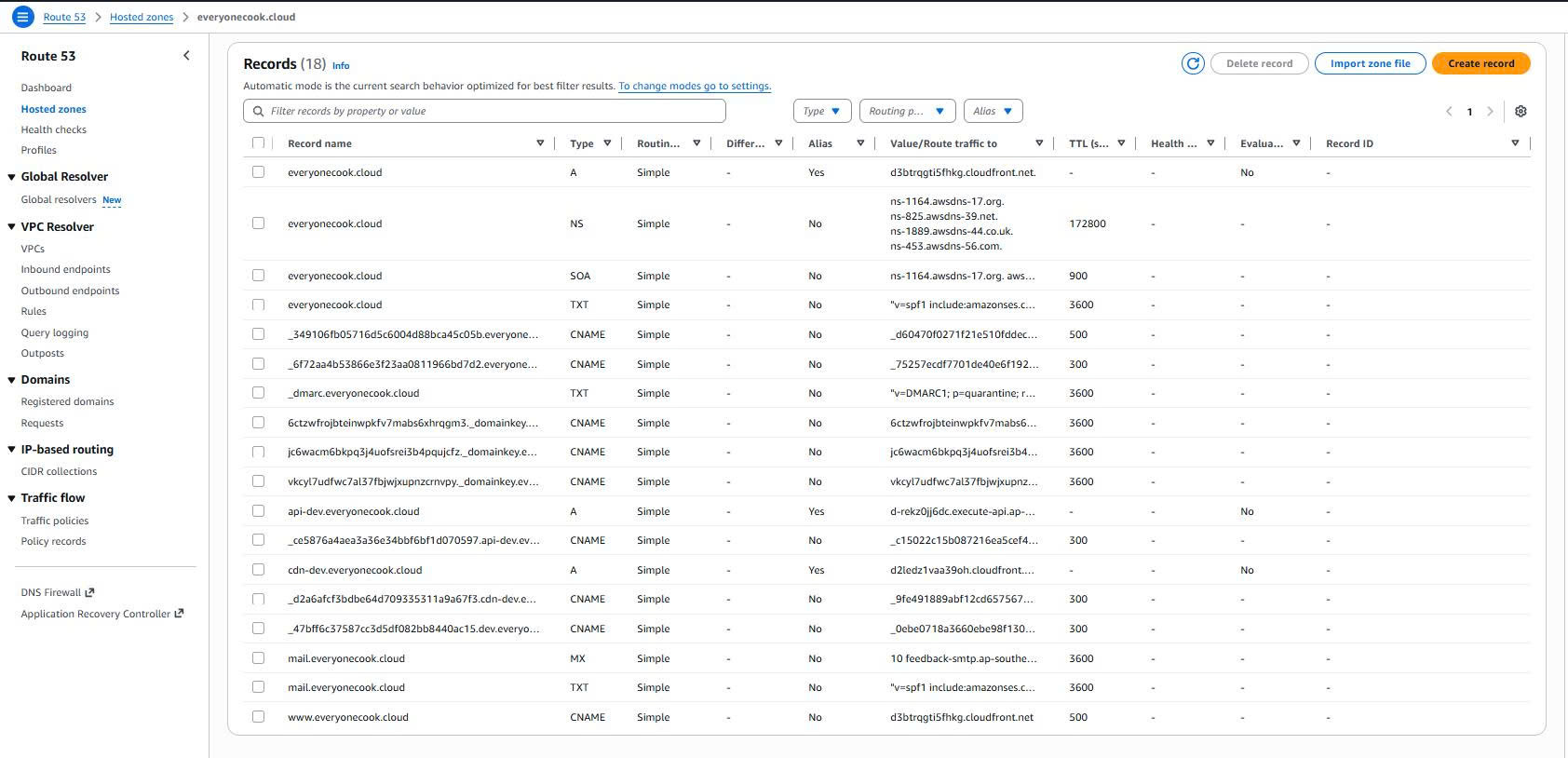 Screenshot: Route 53 showing Amplify DNS records
3. Test Frontend Application
Access URL:
# Via custom domain
https://dev.everyonecook.cloud

# Via Amplify default domain
https://main.d1234567890.amplifyapp.com
Test Features:
- Homepage loads successfully
- HTTPS certificate valid
- User registration works
- Login with Cognito
- API calls to backend
- Images load from CDN
📸 Screenshot Required: Browser showing frontend homepage with DevTools Network tab
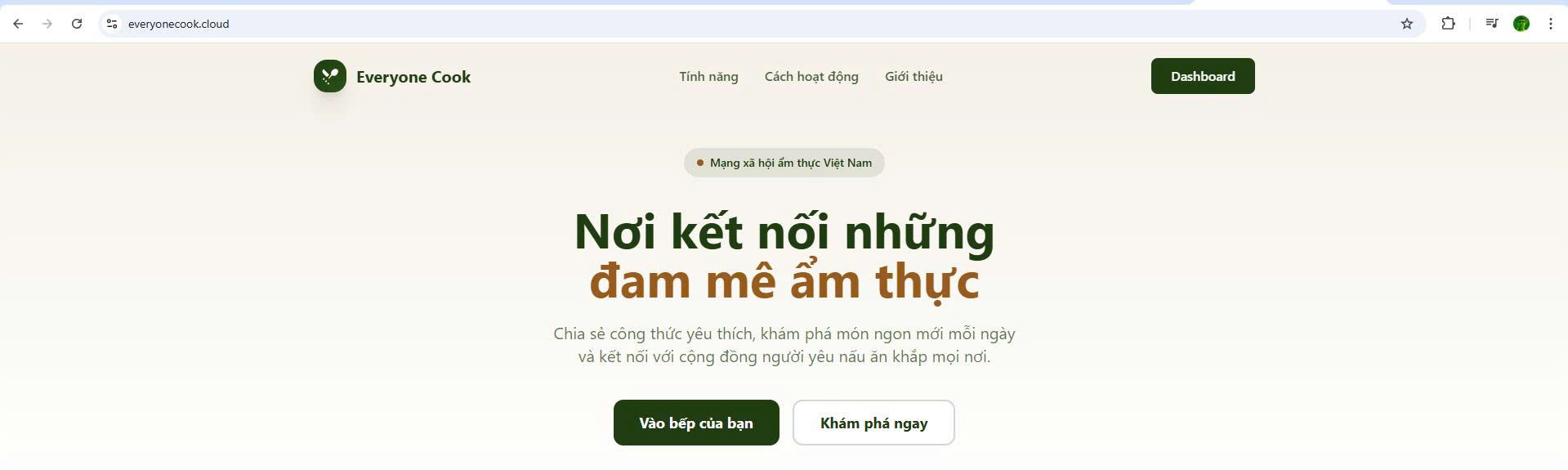 Screenshot: Frontend homepage loaded successfully
4. Verify Environment Variables
📸 Screenshot Required: Amplify Console > Environment Variables
Verify all required variables:
NEXT_PUBLIC_API_URL=https://api-dev.everyonecook.cloud
NEXT_PUBLIC_CDN_URL=https://cdn-dev.everyonecook.cloud
NEXT_PUBLIC_COGNITO_USER_POOL_ID=ap-southeast-1_XXXXXXXXX
NEXT_PUBLIC_COGNITO_CLIENT_ID=xxxxxxxxxxxxxxxxxxxxx
NEXT_PUBLIC_COGNITO_REGION=ap-southeast-1
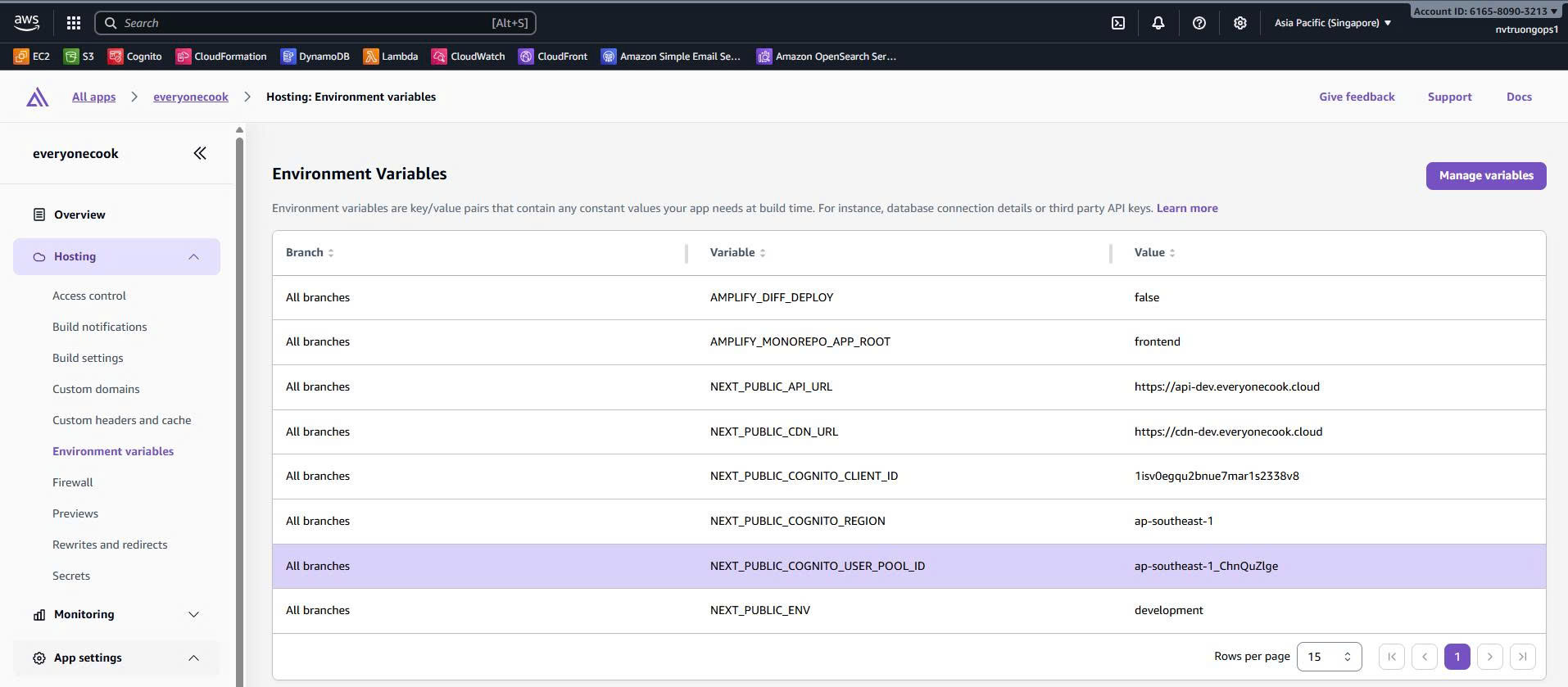 Screenshot: Amplify environment variables configured
Best Practices
1. Environment Management
- ✅ Use separate Amplify apps for dev/staging/prod
- ✅ Configure environment variables in Amplify Console
- ⚠️ DO NOT commit
.env.productionto Git - ✅ Use
.env.exampleto document required variables
2. Build Optimization
- ✅ Enable caching:
node_modules+.next/cache - ✅ Use
output: 'standalone'for smaller bundle - ✅ Optimize images: AVIF, WebP formats
- ✅ Enable gzip compression
3. Security
- ✅ Set security headers (HSTS, CSP, X-Frame-Options)
- ✅ Use HTTPS only (enforce via Amplify)
- ✅ Validate environment variables at build time
- ⚠️ Do not expose sensitive data in client code
4. Monitoring
- ✅ Monitor build logs in Amplify Console
- ✅ Set up build notifications (email, Slack)
- ✅ Check CloudWatch metrics for CDN
- ✅ Monitor error rates and performance
Summary
Frontend Stack configuration highlights:
✅ Next.js 15 SSR application
✅ AWS Amplify hosting with automatic deployment
✅ GitLab CI/CD integration
✅ Custom domain with Route 53 + ACM
✅ Environment variables management
✅ Security headers and optimization
🔗 Next Step: Deploy to Amplify (5.10) - Detailed deployment process
Reference
- AWS Amplify Documentation: https://docs.aws.amazon.com/amplify/
- Next.js Deployment: https://nextjs.org/docs/deployment
- Frontend Source:
everyonecook/frontend/ - Build Config:
everyonecook/frontend/amplify.yml